Microwave troubleshooting guide: quick fixes for common microwave problems in minutes.
I have repaired many microwaves and written this microwave troubleshooting guide to help you diagnose and fix faults fast and safely. This post breaks down causes, step-by-step checks, tools, and clear fixes so you can solve issues without stress. Read on to learn easy tests, real fixes I use, and smart tips to avoid costly repairs.

Common microwave problems and quick fixes
Below are the most common issues you will see and the quick fixes that often work. This microwave troubleshooting guide focuses on clear steps you can take at home. I write in plain words and share safe fixes.
-
Microwave does not turn on
Short check: ensure power cord is intact and plug is in. Check the house circuit breaker and the outlet with another device. -
Microwave runs but does not heat
Common cause: faulty diode, magnetron, or door switch. If it hums but won’t heat, do not keep running it; call a pro if you lack parts and safety gear. -
Plate does not rotate
Check the turntable coupler and motor. Clean food debris and test the motor by hand after unplugging. -
Sparks or arcing inside
Remove metal or foil and check for paint chips or food residue. If the waveguide cover is damaged, replace it. -
Timer or display blank
Often a blown thermal fuse or bad control board. Try unplugging for a few minutes. If display stays dead, professional repair is likely needed. -
Loud noise or grinding
Could be a worn fan, turntable motor, or magnetron problem. Stop use if noise is unusual and inspect the fan and roller guide.
This microwave troubleshooting guide covers simple steps and when to stop. Safety first. If you smell burning or see smoke, unplug immediately and seek help.
Step-by-step safety checklist before troubleshooting
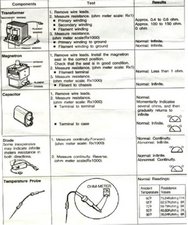
Safety is the top priority in any microwave troubleshooting guide. Microwaves store lethal energy even when unplugged. Follow these steps to stay safe.
- Unplug the microwave from the wall before opening it.
- Use insulated tools and avoid touching internal components.
- Discharge the high-voltage capacitor before touching inside parts. If unsure, let a technician handle it.
- Work in a well-lit area and keep children and pets away.
- Wear safety glasses and gloves when inspecting sharp or hot parts.
I once tried to test a capacitor without discharge tools. I learned fast to stop and call a pro. It is not worth the risk.

How to diagnose specific issues
Use simple tests. These are safe checks you can do without special parts. This microwave troubleshooting guide explains each test step.
-
Check power and outlet
Plug a lamp or phone charger into the outlet. If that device works, the outlet is fine. If not, check the breaker. -
Inspect the door switches
Open the door and press each switch with a small screwdriver. If a switch does not click, it may fail the safety interlock and stop the microwave from running. -
Test the turntable motor
Remove the glass plate and coupler. Spin the motor shaft by hand. If it resists or is noisy, replace the motor or roller guide. -
Listen for the magnetron
If the microwave powers on and hums but does not heat, the magnetron or diode could be bad. This is often a job for a technician due to high voltage parts. -
Look for arcing sources
Check cookware for metal. Examine the cavity for chipped paint or burrs. Replace any damaged waveguide cover. -
Use a simple water test for heating
Place a cup of water in the microwave. Heat for 60 to 90 seconds on high. If the water is warm, the microwave heats. If not, stop and inspect.
This microwave troubleshooting guide helps you narrow down problems fast. Keep notes on what you test. It helps if you call a repair service.

When to repair vs replace
Deciding whether to repair or replace is key in this microwave troubleshooting guide. Use these rules to decide.
-
Age matters
If the microwave is under 5 years and the issue is a simple part, repair it. If older than 8–10 years, replacement often makes more sense. -
Cost of repair
If repair costs exceed half the price of a new unit, replace it. Magnetron and diode repairs can be costly. -
Safety and reliability
If the unit shows signs of electrical damage or fire, replace it. Safety problems are not worth saving money. -
Frequency of trouble
If you repair one fault and another pops up soon, get a new microwave. Repeated fixes add up.
From my experience, a clean, modern unit is often cheaper than repeated repairs. I keep a budget for small parts, but I replace units that fail key components.

Preventive maintenance tips
A little care helps avoid many fixes in your microwave troubleshooting guide. Do these easy tasks weekly or monthly.
- Wipe the interior after use with a damp cloth to avoid buildup.
- Use microwave-safe containers only and avoid metal.
- Cover food to reduce splatter. That prevents residue and arcing.
- Check door seals and hinges for wear and clean them gently.
- Avoid running empty for long times. Add a cup of water if you test.
I once let grease build up and then had arcing. A quick clean fixed the issue and saved a service call.
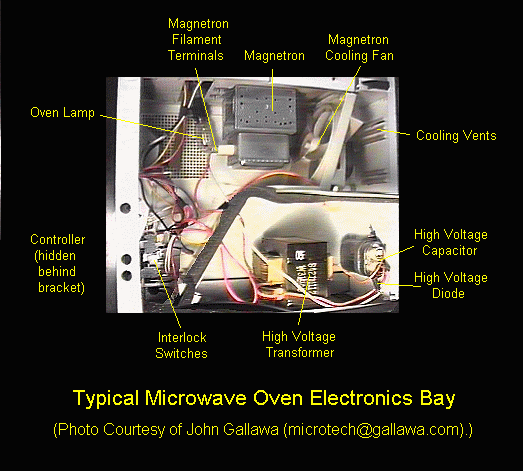
Tools and parts list for basic repairs
Keep a small kit for common fixes in your microwave troubleshooting guide. These tools help do safe checks and small part swaps.
- Insulated screwdrivers for external panels and knobs.
- Multimeter to check fuses, switches, and continuity.
- Needle-nose pliers for small clips.
- Replacement roller guide, turntable coupler, or door switch (model-specific).
- Safety gloves and eye protection.
Always buy parts that match the model number. Using the wrong part can cause bigger faults. If you are unsure about a high-voltage repair, hire a licensed technician.

Troubleshooting examples and real-life cases
Here I share clear examples from my work to make this microwave troubleshooting guide practical. Simple stories help you apply steps.
Case 1: No heat, loud hum
I had a unit that hummed but did not heat. I did the water test and found no heat. I checked the diode and magnetron continuity with a multimeter. The diode was open. Replacing the diode fixed it. Lesson: start with easy parts that fail often.
Case 2: Sparks inside
A customer used a metal-trim dish. Sparks happened. I cleaned the cavity and replaced a scorched waveguide cover. The microwave worked fine after replacing the cover and using a safe dish. Lesson: use the right cookware.
Case 3: Display blank
A microwave had a dead display after a power surge. A quick outlet check showed power. The control board was fried. Repair cost was high. We opted for a new unit. Lesson: know when to replace.
These real cases show how this microwave troubleshooting guide works in real life. Small checks often solve big issues. Safety and model knowledge matter.
Frequently Asked Questions of microwave troubleshooting guide
What should I check first if my microwave won’t turn on?
Check the power source first. Test the outlet with another device, check the fuse or breaker, and ensure the power cord is not damaged.
Why does my microwave run but not heat?
If it hums but does not heat, the magnetron, high-voltage diode, or capacitor may be faulty. Turn it off and consider a technician for high-voltage parts.
Can I use a multimeter to test microwave parts?
Yes, a multimeter can test fuses, switches, and continuity. Do not test high-voltage parts like the capacitor without proper discharge tools and training.
Is it safe to open a microwave to fix it?
Opening a microwave can be dangerous due to stored charge. Unplug it and discharge the capacitor, or hire a pro if you are not trained.
How often should I clean my microwave?
Wipe the interior after each use and deep clean weekly to avoid food buildup and arcing. Regular cleaning prevents many common faults.
When should I replace my microwave instead of repairing it?
Replace it if repair costs are high, the unit is older than 8–10 years, or there are signs of electrical damage or repeated failures.
Conclusion
This microwave troubleshooting guide gives clear steps, safety rules, and real fixes you can try. Start with the simple checks: power, door switches, and a water test. Clean and care for your unit to avoid many problems. When a high-voltage part is at fault or repairs cost too much, choose replacement.
Take action today: try the safe checks, keep a small tool kit, and note your model number for parts. If you found this guide helpful, subscribe for more home repair tips or leave a comment with your microwave issue.