Microwave Button Delay: Fixes, Causes And Quick Tips
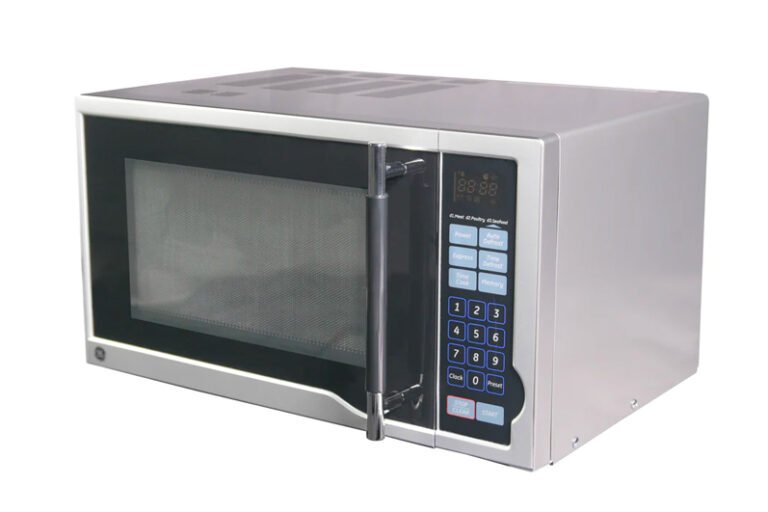
Microwave button delay happens when the keypad or control board lags before responding.
I have worked with kitchen appliance repair and tested many microwaves, so I know why microwave button delay frustrates users. This guide breaks down causes, quick checks, safe fixes, and prevention in plain language. Read on to learn how to diagnose and solve microwave button delay with clear steps you can try at home or ask a technician to do.

What is microwave button delay?
Microwave button delay is a lag between pressing a key and the oven starting or showing a change.
The delay can be a half second or several seconds. It may affect one button or the whole keypad.
Sometimes the delay is by design. Newer models add a small pause to prevent accidental starts.
Other times it signals a failing touchpad, loose connector, or control board problem.
Common causes of microwave button delay
-
Faulty touchpad or membrane
The plastic keypad can wear out. Dirt or moisture can block contact and cause delay. -
Loose ribbon cable or connector
The connection between the keypad and control board can be loose. That causes intermittent lag. -
Aging control board or faulty relay
Electronic parts like capacitors and relays age. They can slow signal processing. -
Software or firmware behavior
Some microwaves have built-in debounce or safety checks that add intentional delay. -
Power supply issues
Low voltage or a weak capacitor in the power circuit can make the board respond slowly. -
Dirty or corroded contacts
Spills that reach the keypad area can corrode contacts and introduce lag. -
Door interlock or safety switch faults
A door switch that misreads state can cause the controller to add delay or ignore input. -
Surge or electrical events
A recent power surge can damage components and produce button lag.
I have seen microwaves that only delayed when the kitchen was humid. Cleaning and reseating a ribbon fixed them. Other times a control board needed replacement.

How to diagnose microwave button delay
-
Observe the behavior
- Test several buttons. Note which buttons lag and how long the delay lasts.
- Try simple commands like start/stop and timed cooking.
-
Power cycle
- Unplug the microwave for 60 seconds and plug it back in. This can clear minor glitches.
-
Check for patterns
- Does delay happen only after long use, or after a spill? Pattern helps point to cause.
-
Clean the keypad
- Wipe the control panel with a soft, slightly damp cloth. Avoid letting moisture enter seams.
-
Inspect the keypad visually
- Look for sticky residue, warping, or sun damage. A damaged pad often needs replacement.
-
Listen and watch for error codes
- Some microwaves show codes or flash lights that point to a control board issue.
-
Check the power source
- Test the outlet or try another circuit. A weak supply can cause slow response.
-
Note recent events
- A recent power surge, heavy spill, or impact can cause new delay.
I recommend doing the visual and power checks first. They are safe and often solve the issue. If the lag persists, the problem is likely internal.

How to fix microwave button delay — DIY and when to call a pro
Safety first. Microwaves contain high-voltage parts. Unplug before any inspection. If you are not comfortable with electronics, call a technician.
DIY steps you can try
-
Power reset
Unplug for 1–5 minutes and plug back in. This clears temporary software glitches. -
Clean the control panel
Use a soft cloth and mild cleaner. Do not spray directly into seams. -
Reseat the ribbon cable
If you can access the keypad safely, unplug and reinsert the ribbon connector. Tighten any loose clips. -
Replace the touchpad or membrane
These parts are inexpensive and often easy to swap. Follow the service manual for your model. -
Check and replace fuses
A blown fuse can cause odd behavior. Replace only with the correct spec fuse.
When to call a pro
-
Control board replacement needed
If the board is damaged or capacitors are bad, get a trained tech. -
High-voltage work
Anything near the magnetron or high-voltage capacitor should be handled by a pro. -
Complex diagnostics
If the issue is intermittent or paired with other faults (no heat, strange noises), seek service.
From my experience, simple resets and cleaning fix many cases. But when a control board is at fault, repair costs rise and professional help is safer.

Preventive maintenance and tips to avoid microwave button delay
-
Keep the keypad clean
Wipe spills quickly. Avoid letting food and steam sit near seams. -
Use gentle presses
Avoid pounding buttons. Gentle, steady presses preserve the membrane. -
Unplug during storms or use a surge protector
Protect electronics from spikes that can damage control boards. -
Allow proper ventilation
Overheating affects electronics and speeds wear on control boards. -
Update firmware if available
Some models receive fixes that improve keypad responsiveness. -
Service checks for older units
If your microwave is 8–10 years old, budget a service check to prevent surprises.
These low-effort steps cut down on microwave button delay and add years to the appliance.
Cost and timeframe for repairs
-
Touchpad replacement
Typical cost: $20–$80 for part. Time: 30–60 minutes with basic tools. -
Control board replacement
Typical cost: $80–$300 for parts and labor. Time: 1–2 hours. -
Simple service call for diagnostics
Typical cost: $60–$120 for a visit. Time: 30–60 minutes. -
Full appliance replacement
If repair cost nears 50% of a new unit, replacement may be more cost effective.
In my work, a keypad swap is fast and cheap. Control board issues take longer and cost more. Always compare repair cost to the microwave’s remaining life.

Frequently Asked Questions of microwave button delay
Why does my microwave have a slow response after I press a button?
A slow response usually means the keypad or control board is not sending or processing signals fast enough. Try a power reset and a gentle clean; if that fails, inspect the ribbon connector or get a technician.
Can moisture from cooking cause button delay?
Yes. Steam and spills can get into seams and corrode contacts or make the membrane sticky, which causes delay. Wipe the panel dry and clean spills promptly.
Is a button delay dangerous?
Button delay alone is not usually dangerous. However, if delay comes with sparks, burning smells, or no heat, unplug the microwave and call a pro right away.
Will a factory reset fix microwave button delay?
A factory reset can clear software glitches and sometimes fixes delay. Unplugging for a minute is a simple reset. If delay remains, the issue is likely hardware.
How long should I wait before replacing the microwave for delay problems?
Consider age and repair cost. If your microwave is over 8–10 years old and a control board repair is costly, replacement may be more practical. For minor keypad fixes, replacement is usually unnecessary.
Conclusion
Microwave button delay often has simple causes like dirt, a loose ribbon, or a software hiccup. Test basic steps first: clean the keypad, power cycle, and check connections. For deeper electrical faults, seek professional service to stay safe. Take action now by trying the quick checks above, and share your experience or questions below to get tailored tips.